

09 December, 2025
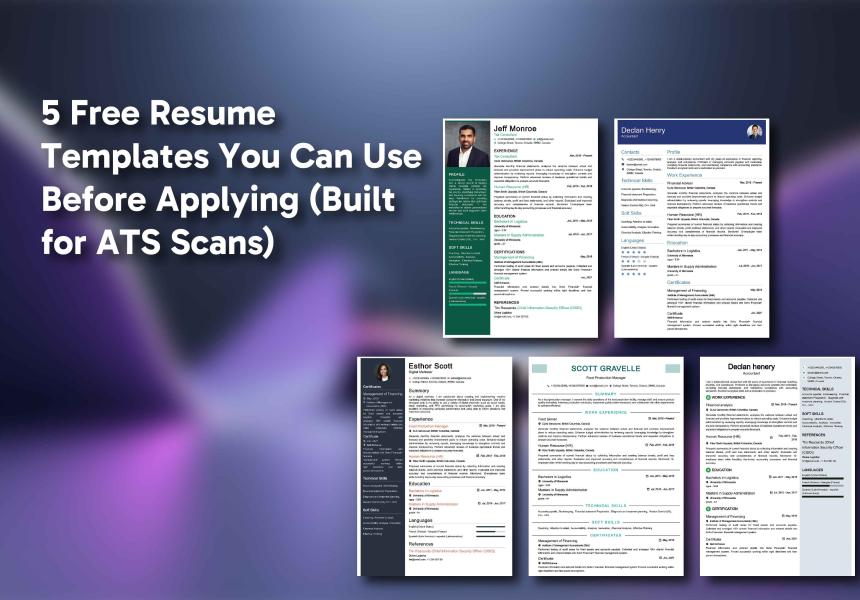
5 Free Resume Templates You Can Use Before Applying (Built for ATS Scans)
Anyone who has applied for jobs online lately already knows the first painful truth: most resumes aren’t rejected by a person. They’re rejected by software. Before your application ever reaches a real recruiter, it sits in a system that scans it, sorts it, and sometimes misreads half of it. And that’s exactly why so many people look for free resume templates that don’t collapse the moment an ATS (Applicant Tracking System) tries to read them.Funny enough, a lot of beautifully designed templates fail right at the start. They look great to humans, but ATS tools can’t make sense of columns, text boxes, icons, decorative spacing, or those “creative” layouts with sidebars. It’s why job seekers keep wondering why nobody is calling them back, even when they’re qualified.
The goal isn’t to make a resume that looks fancy. It’s to make a resume that actually reaches someone. If you’ve spent time on job portals like AI Job Orbit, you’ve seen how fast listings move. Some are open for a day. Some disappear within hours. You really don’t have time to use a template that looks stylish but disappears into a system glitch.
That’s where ATS-friendly templates come in. And you don’t have to pay for them. There are plenty of free options if you know what to look for. This blog breaks down five types of templates that consistently make it through the first scan. Nothing complicated. Nothing overdesigned. Just formats that work. Let’s go through them one by one.
1. The Single-Column Template (The Safest Choice)
Though a single column may seem ordinary, it is rather favoured by ATS systems. They would not be puzzled. They would not separate your parts. The entire document would flow through one neat reading line.
Templates like these usually have:
1. A clear header
2. Bold section titles
3. Bullet points
4. One simple layout from top to bottom
AI Pro Resume offers several resume templates with this structure, and they always perform better than the multi-column ones on strict ATS systems.
Why this works: ATS tools read from left to right. If you give them only one path, nothing gets lost. If your text is split into multiple compartments, some systems skip entire sections.
This template type pairs well with:
1. Resume format guides
2. People with a steady work history
3. Anyone applying to corporate roles or government roles
Nothing flashy. But it works.
2. The Minimalist Template for Fast Scanning
This template is even more straightforward than the traditional one-column style. Imagine a very neat and spacious layout that offers a bit of room between parts and has no design elements at all that might confuse an applicant tracking system. A well-known company's ATS guide even points out that such layouts attract less attention due to fewer shapes, fewer symbols, consistently aligned text, and the use of standard fonts.
This template is perfect for:
1. Technology
2. Engineering
3. Medical
4. Operations
5. Positions where hiring managers look for clarity rather than creativity
A clean layout directs the hiring manager's attention to your qualifications and work experience instead of extravagant graphic designs.
You may instead enhance it with:
1. Concise phrases
2. Significant accomplishments
3. Appropriate keywords
Moreover, at this point, the quality of resume writing becomes more important than the design.
3. The ATS Resume With Strong Headers (Easy for Humans + Software)
One thing that gets ignored way too often: ATS systems rely heavily on section headers. If your resume uses creative wording like “My Journey” instead of “Work Experience,” the system may not tag it correctly.
Templates that use:
1. “Experience”
2. “Skills”
3. “Education”
4. “Certifications”
5. “Summary”
tend to perform the best.
AI Pro Resume’s builder automatically uses industry-standard headers for this reason. You can edit the content without breaking the core structure.
Why did the hiring professionals prefer such professional resumes? After the resume successfully got through the system checking, the human reader could just go through the titles fast without any deep thinking.
People do not take into account how exhausted recruiters are, mostly with reading sixty to eighty percent of the applications daily. Nice and clear titles actually support more than one could suppose.
4. The Modern Resume Design That Stays ATS-Friendly
Not every up-to-date format puts ATS at risk. A few organizations manage to maintain a clean aesthetic while being technically sound at the same time.
For instance, AI Pro Resume has come up with really modern types of resumes, but their design still consists of a single reading line. Decorative text boxes and graphic-heavy borders are completely out of the picture. Only modern fonts and spacing are applied.
Typically, a modern and safe type of template incorporates the following elements:
1. A bold name header
2. Light use of lines or separators
3. Subtle spacing
4. Strong hierarchy
5. Bullet points instead of long paragraphs
This approach is very suitable for the following professions:
1. Marketing
2. Creative sectors
3. Product roles
4. Customer support
5. Retail management
It is modern but not flashy. ATS is not confused. Recruiters are not straining their eyes.
5. The Template Built for Metrics (Great for high-impact roles)
Some templates are simple by design but built to highlight measurable achievements. They leave more room for bullet points, short sentences, and metrics.
This template type is great for:
1. Sales
2. Growth roles
3. Operations
4. Finance
5. Management roles
A format like this lets you write things such as:
1. “Increased monthly traffic by 40% using…”
2. “Closed $1.2M in new business in Q3…”
3. “Reduced operating costs by 15% through…”
ATS systems love metrics. Recruiters love metrics. You can’t go wrong.
AI Pro Resume has resume examples for this style, and many users utilize the structure because it gets noticed fast.
Why Free Resume Templates Aren’t Enough by Themselves
Many people believe that a nice template can solve everything. It is not true. The template is only the outline. Your text is the image that fills the outline.
Tools like these go a long way in making the process easier:
1. An ATS checker reveals any infringements in formatting
2. Cover letter templates assist in unifying the tone with your resume
3. Cover letter examples revive your creativity when you are in a void
4. A CV builder caters to CV templates in case you are seeking global positions
5. Tutors like How to write a CV provide the way for worldwide applications
AI Pro Resume brings all these elements together. Your template, formatting, and writing remain completely in sync with what ATS systems require.
Why ATS-Friendly Resumes Matter More on Job Portals
AI Job Orbit and similar job portals are filled with numerous postings from various industries. The applicant tracking systems (ATSs) used by different corporations vary. Some are cutting-edge. Some are... not that much so. And the older the systems are, the more likely they are to malfunction.
A resume that survives every ATS:
1. Gets seen faster
2. Gets ranked higher
3. Gets considered by humans
4. Gets callbacks sooner
That’s the point of choosing the right template in the first place.
Common Mistakes People Make With Free Templates
Let’s go through a few quick ones:
1. Using two columns
Looks pretty. Breaks the scan.
2. Using icons for contact info
An ATS cannot read a phone icon.
3. Putting details inside text boxes
Many systems skip boxed content entirely.
4. Choosing ultra-light fonts
ATS reads them poorly.
5. Not saving as a PDF
Unless told otherwise, PDF keeps most formatting safe. These little things cost applicants interviews without them realizing what happened.
Conclusion
These five free resume templates aren’t magic, but they do something crucial: they help your resume make it through the first step. Without that, the rest doesn’t matter. Recruiters can’t hire you if they never see your application.
And because hiring has shifted so heavily toward automation, ATS-friendly formatting matters more than it ever did. The clearer your document, the smoother the scan.
If you need a starting point, AI Pro Resume has both modern resume designs and safe standard options, along with an ATS checker to make sure nothing breaks before you submit your next application. It also provides resume tips so you don't miss out on anything that would put your job goals at risk. Once your resume is built right, job portals do the rest, matching you with companies that are actually hiring.
Frequently Asked Questions (FAQs)
Are free resume templates actually good enough?
They can be, yes. The trick is picking one that doesn’t confuse the software scanning your resume. A lot of the free ones online look nice, but fall apart the moment an ATS tries to read them. If the template is simple, single-column, and uses normal section headers, it usually works fine. The design isn’t the important part; the clarity is.
Do free templates pass ATS scans?
Some do, some really don’t. Anything with text boxes, icons, or fancy layouts tends to trip scanners up. The safer ones are the plain job application letter templates people think are “too simple,” but those are the ones that usually survive the first pass. If you want to be sure, running it through an ATS checker is the easiest way to avoid surprises.
Is a simple resume better than a fancy one?
Most of the time, yes. Recruiters skim through. ATS systems skim through. Simple formats keep everything in place. Basic formats help to keep the order intact. Overly designed layouts might be suitable for portfolios or artistic roles, but, for standard applications, neat and simple usually prevail.
Related Posts






27 Jan, 2026

